

Variable compensation software built for complex pay plans.
Automate variable pay and incentive compensation: commissions, tiers, splits, overrides, bonuses and clawbacks. Show every rep what they earned, then carry approved pay directly into payroll.
Built for teams with compensation that doesn't fit in a spreadsheet.
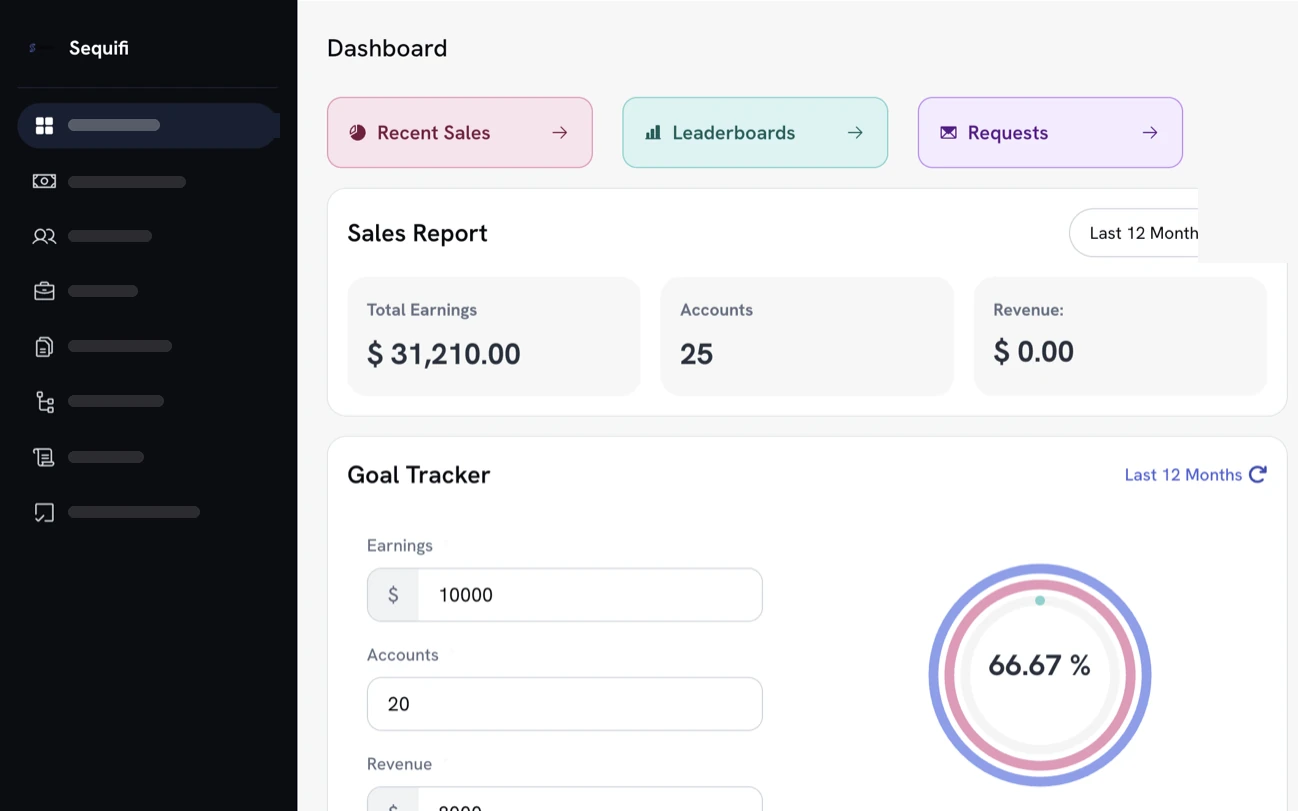

- Handles
- Commission calculation
- Commission tracking
- Tiers + splits
- Overrides
- Clawbacks
- Approvals
- Payroll
- Rep visibility
Automated calculations
Tiers, splits, bonuses, overrides, deductions and clawbacks applied from your rules, every cycle.
Real-time visibility
Reps and managers see current earnings without asking operations for another spreadsheet.
Fewer commission disputes
Every payout shows the rule and the numbers behind it, line by line.
Built to scale
Different plans across teams, roles, offices and locations stay in one system.
Trusted by commission-driven teams where compensation gets complicated
Trusted by 20,000+ reps, managers, and operators


'%3e%3cpath%20d='M31.2869%2012.8799H33.7746C33.9584%2014.5955%2035.0859%2015.4656%2037.1325%2015.4656C38.5908%2015.4656%2039.7918%2014.8406%2039.7918%2013.5171C39.7918%2012.0833%2038.4682%2011.7647%2036.3481%2011.2745C33.8604%2010.723%2031.7771%2010.0612%2031.7771%207.38966C31.7771%204.86515%2033.8604%203.59064%2036.7035%203.59064C39.804%203.59064%2041.5932%205.07348%2041.8506%207.53672H39.4364C39.2403%206.22544%2038.2476%205.49015%2036.679%205.49015C35.1962%205.49015%2034.2035%206.11515%2034.2035%207.16907C34.2035%208.40681%2035.4903%208.72544%2037.5614%209.15436C40.0369%209.69358%2042.3163%2010.4289%2042.3163%2013.3088C42.3163%2015.9558%2040.0981%2017.4509%2037.1325%2017.4509C33.4805%2017.4509%2031.4094%2015.6004%2031.3114%2012.8799H31.2869Z'%20fill='black'%3e%3c/path%3e%3cpath%20d='M46.9485%2012.647V3.79901H49.424V12.598C49.424%2014.3872%2050.4044%2015.3064%2052.3039%2015.3064C54.2034%2015.3064%2055.1348%2014.3505%2055.1348%2012.5613V3.79901H57.6226V12.6348C57.6226%2015.7843%2055.5637%2017.3652%2052.2794%2017.3652C48.9951%2017.3652%2046.9363%2015.8088%2046.9363%2012.6348L46.9485%2012.647Z'%20fill='black'%3e%3c/path%3e%3cpath%20d='M62.451%203.79901H65L69.424%2010.7966C70.1348%2011.9608%2071.0907%2013.897%2071.0907%2013.897H71.1397C71.1397%2013.897%2070.9926%2011.8137%2070.9926%2010.4902V3.79901H73.3456V17.1446H70.7966L66.3848%2010.1838C65.6495%208.99509%2064.7059%207.05882%2064.7059%207.05882H64.6691C64.6691%207.05882%2064.7917%209.14215%2064.7917%2010.4657V17.1323H62.4387V3.79901H62.451Z'%20fill='black'%3e%3c/path%3e%3cpath%20d='M79.0688%203.79901H81.5443V14.9755H88.0394V17.1446H79.0811V3.79901H79.0688Z'%20fill='black'%3e%3c/path%3e%3cpath%20d='M94.5713%2011.8749L89.8899%203.81122H92.635L94.5222%207.18132C95.1105%208.25975%2095.8458%2010.0367%2095.8458%2010.0367H95.8825C95.8825%2010.0367%2096.6301%208.28426%2097.2306%207.18132L99.1301%203.81122H101.765L97.0713%2011.9117V17.1446H94.5835V11.8749H94.5713Z'%20fill='black'%3e%3c/path%3e%3cpath%20d='M115%203.79901H117.475V9.16666H123.37V3.79901H125.858V17.1446H123.37V11.2255H117.475V17.1446H115V3.79901Z'%20fill='black'%3e%3c/path%3e%3cpath%20d='M129.963%2010.5147C129.963%206.51958%20132.488%203.55389%20136.52%203.55389C140.552%203.55389%20143.076%206.50732%20143.076%2010.5147C143.076%2014.522%20140.552%2017.451%20136.52%2017.451C132.488%2017.451%20129.963%2014.4975%20129.963%2010.5147ZM140.539%2010.5147C140.539%207.73282%20139.179%205.60046%20136.544%205.60046C133.909%205.60046%20132.488%207.73282%20132.488%2010.5147C132.488%2013.2965%20133.885%2015.3554%20136.544%2015.3554C139.204%2015.3554%20140.539%2013.272%20140.539%2010.5147Z'%20fill='black'%3e%3c/path%3e%3cpath%20d='M147.194%203.79901H150.478L152.66%2010.147C153.174%2011.7034%20153.824%2014.6323%20153.824%2014.6323H153.873C153.873%2014.6323%20154.522%2011.7279%20155.025%2010.147L157.182%203.79901H160.539V17.1446H158.223V10.1838C158.223%208.72548%20158.383%206.0294%20158.383%206.0294H158.346C158.346%206.0294%20157.794%208.48038%20157.365%209.81617L154.841%2017.1446H152.831L150.282%209.81617C149.853%208.49264%20149.302%206.0294%20149.302%206.0294H149.265C149.265%206.0294%20149.424%208.73774%20149.424%2010.1838V17.1446H147.206V3.79901H147.194Z'%20fill='black'%3e%3c/path%3e%3cpath%20d='M166.605%203.79901H176.36V5.91911H169.081V9.21568H175.515V11.201H169.081V14.9632H176.52V17.1323H166.605V3.79901Z'%20fill='black'%3e%3c/path%3e%3cpath%20d='M11.5195%2020H1.45825L8.19845%2011.2133H18.2597L11.5195%2020Z'%20fill='%233680F8'%3e%3c/path%3e%3cpath%20d='M10.0613%208.78677H0L6.7402%200H16.8015L10.0613%208.78677Z'%20fill='%233680F8'%3e%3c/path%3e%3c/g%3e%3cdefs%3e%3cclipPath%20id='clip0_424_22397'%3e%3crect%20width='176.52'%20height='20'%20fill='white'%3e%3c/rect%3e%3c/clipPath%3e%3c/defs%3e%3c/svg%3e)














Trusted by 20,000+ reps, managers, and operators across commission-led teams




Your variable pay plan isn't the problem. Managing it in spreadsheets is.
As teams grow, compensation gets complicated. Different roles. Different rates. Tier changes. Splits. Overrides. Bonuses. Adjustments. Clawbacks.
Sequifi turns those rules into an automated compensation system, without rebuilding a spreadsheet every pay period.
Every pay period, by hand
=IF(G4>25,0.09,0.07)*E4=E4*0.35-VLOOKUP(…)=SUMIF(team,B7,payout)*0.02=-1*INDEX(prior!D:D,…)=IFERROR(#REF!,0)Rebuilt, re-checked and re-reconciled every cycle.
Once, as a rule
Applied automatically, the same way, every cycle.
From performance to payday. One connected flow.
Sequifi applies your compensation rules automatically as the underlying data changes. Admins review the calculation, approve pay, and move directly into payroll, while reps can see what they earned and why.
- 1
Performance / deal data
A deal closes at $38,400 - 2
Commission calculation
Tier 2 applies: 9% is $3,456.00 - 3
Review + approval
Ops reviews the period and approves - 4
Payroll
Included in Friday’s pay run - 5
Rep visibility
The rep sees it, line by line
Your comp plan can be complicated. Your software should understand it.
Plans stay as flexible as they need to be, without forcing your back office to hand-calculate every exception.
Tiered commissions
Rates step up as each threshold is crossed.
Splits
One deal divided across setters and closers by rule.
Manager overrides
Team compensation calculated on top, without double maths.
Bonuses
Incentives and spiffs on the same schedule as everything else.
Adjustments
Mid-cycle corrections without rebuilding the period.
Clawbacks
Reverse cancelled business, traceably.
Milestone payouts
Pay released as a job hits each stage.
Role-based plans
Different plans by position, W-2 and 1099 together.
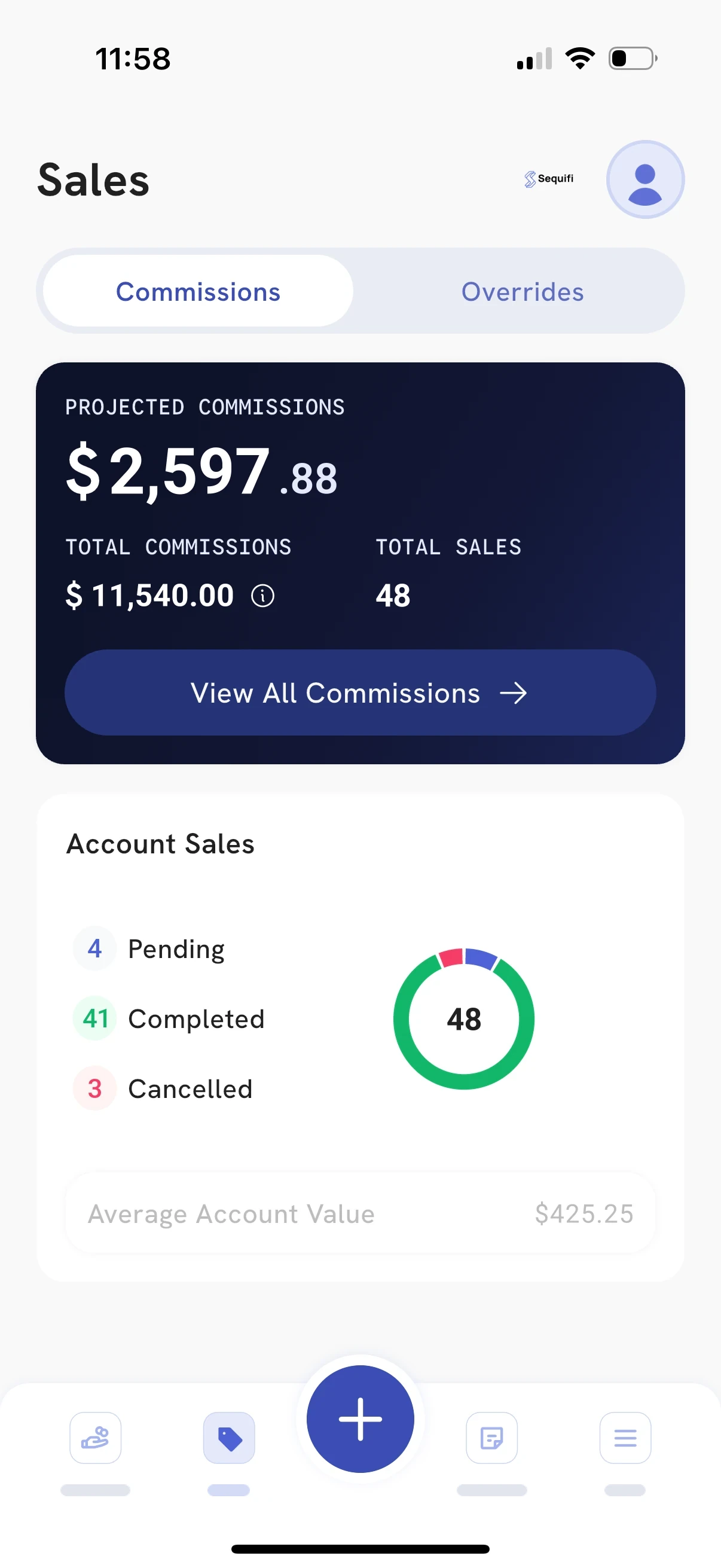
Give reps the answer before they have to ask.
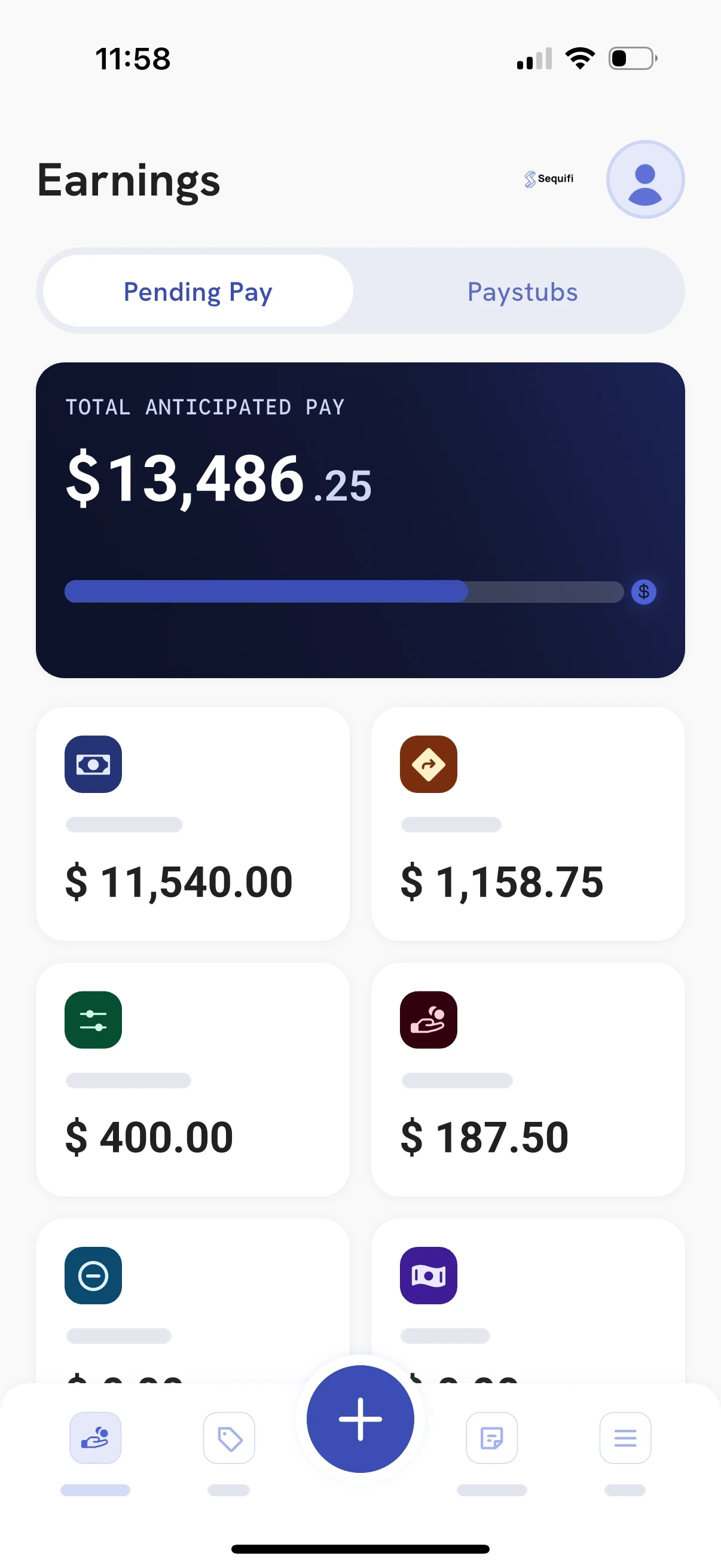
Reps see pending pay for the current period broken into commissions, overrides and adjustments, so they understand their number before payday instead of asking the back office to check it.
Earnings as deals land
Not a number that appears two weeks later.
Commissions and overrides, separated
Each category shown on its own, not as one lump sum.
Adjustments in the open
Corrections are visible rather than an unexplained difference.
Fewer pay disputes
Far fewer “can you check my pay?” messages to your back office.

New roles, new markets, new plans. The math keeps up.
Add a position, change a tier or open a new region, and the new rules apply from the next deal. Nothing to rebuild at the end of the period.
Most commission software stops at the calculation. Sequifi doesn't.
Calculate
Rules applied to live data
Approve
Reviewed before anything pays
Pay
Straight into payroll
The commission your team calculates shouldn't need to be exported, reconciled and rebuilt inside another payroll system. Sequifi connects commission calculation and payroll in one workflow, alongside the HR, onboarding and documents that sit around it.
Three ways to run commissions. Only one of them keeps up.
The manual way
Spreadsheets
- Complex commissionsManual
- Tiered structuresManual
- Splits + overridesManual
- Automatic calculationNo
- Rep visibilityNo
- AuditabilityLimited
- Commission → payrollNo
The partial way
Generic payroll
- Complex commissionsLimited
- Tiered structuresLimited
- Splits + overridesLimited
- Automatic calculationLimited
- Rep visibilityNo
- AuditabilityPartial
- Commission → payrollPartial

The connected way
Sequifi
- Complex commissionsYes
- Tiered structuresYes
- Splits + overridesYes
- Automatic calculationYes
- Rep visibilityYes
- AuditabilityYes
- Commission → payrollYes

Pay day, without the pay day scramble.
Commissions are already calculated and checked when the period closes, so the person who runs pay reviews and approves instead of rebuilding. And when every rep can see what they earned, the second-guessing stops.
- No more “can you check my pay?” messages
- Approve the period instead of rebuilding it
- Fewer disputes, faster payroll
Built for compensation that gets complicated
Sequifi is native to the industries where nearly every paycheck is different. See the fit for your team: solar commission software, roofing commission software, pest control commission software, door-to-door commission software and mortgage commission software, or start with the home services payroll hub.







“If you want to build instant trust with reps, give them full transparency on pay. Sequifi does that for us.”
85%
faster rep onboarding
Variable compensation questions
What is variable compensation software?
Variable compensation software calculates and manages the part of pay that changes with performance: commissions, bonuses, spiffs, tiers, splits, overrides, adjustments and clawbacks. The rules of each pay plan live in the system and run the same way every period, instead of being rebuilt in a spreadsheet. Sequifi also carries approved variable pay straight into payroll, so the number a rep earns is the number they are paid.
Is variable compensation software the same as incentive compensation management (ICM)?
They describe the same job. Incentive compensation management, sales compensation software and variable pay software are all names for tools that turn a pay plan into automated, auditable payouts. Sequifi is built for commission-driven teams, such as solar, roofing, mortgage, fiber and home services, where nearly every paycheck is different.
What kinds of variable pay plans can Sequifi handle?
Tiered and accelerated rates, setter and closer splits, manager and team overrides, milestone payouts, bonuses and spiffs, draws, adjustments and clawbacks on cancelled business. Plans can differ by role, team, office and location, for W-2 and 1099 workers together.
How is Sequifi different from other variable compensation tools?
Most variable compensation tools stop at the calculation and export a file for payroll. Sequifi calculates, routes the period for approval and pays it through built-in payroll, alongside the HR, onboarding and documents around it, so there is no export and re-entry between systems.
Can reps see their variable pay before payday?
Yes. Reps see pending pay for the current period, broken into commissions, overrides and adjustments, with the rule behind each line. That visibility is what cuts the "can you check my pay?" messages to the back office.
How long does it take to set up?
It depends on how many plans and roles you run. In a demo we walk through your actual pay plan and show how it would be configured, so you can judge the fit before committing.

Your variable comp plan can be complicated. Running it shouldn't be.
See how Sequifi calculates, approves and pays complex compensation.
See Sequifi in action.
Tell us how your team gets paid and we'll show you how Sequifi calculates, approves and pays it.