

Commission software built for complex pay.
Automate commission calculations, track every payout and show each rep exactly what they earned, then carry approved commissions directly into payroll.
Built for teams with compensation that doesn't fit in a spreadsheet.
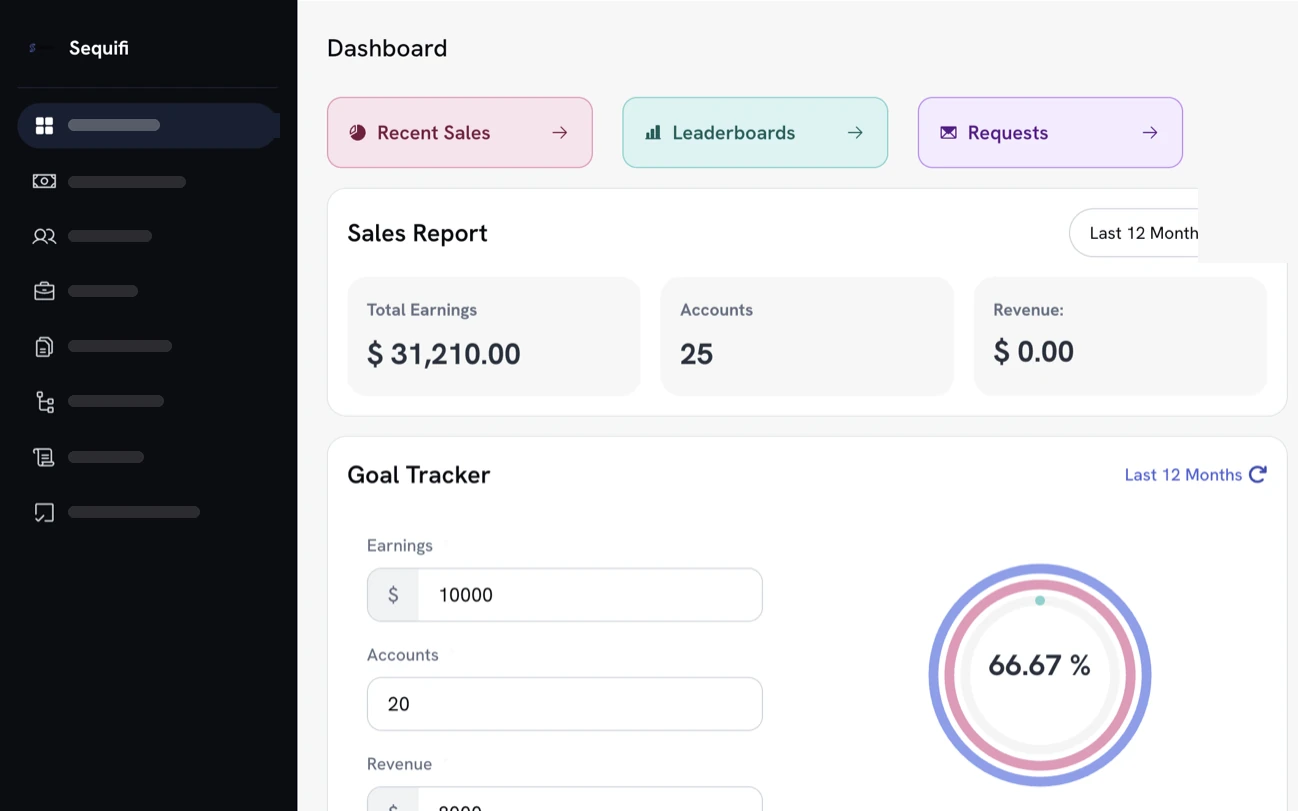

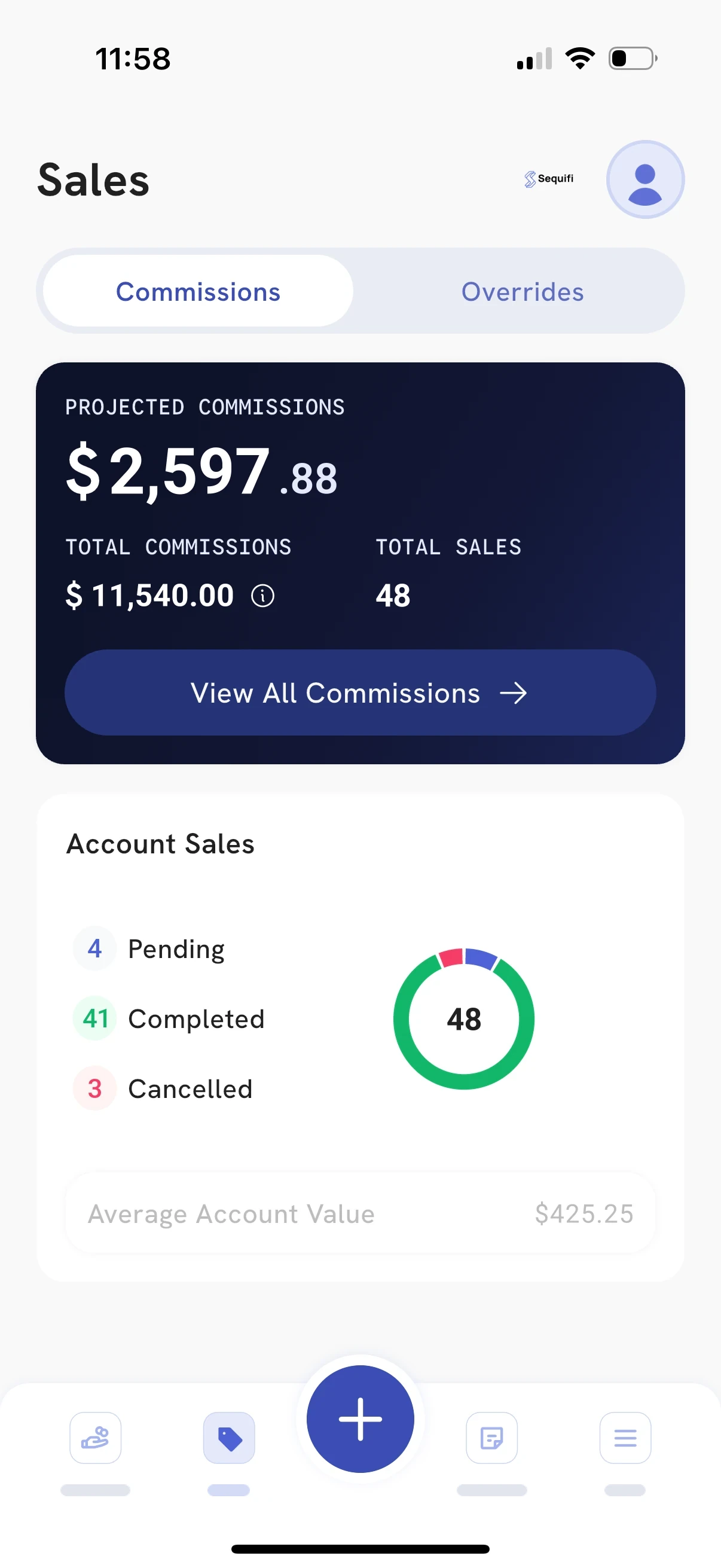
- Handles
- Commission calculation
- Commission tracking
- Tiers + splits
- Overrides
- Clawbacks
- Approvals
- Payroll
- Rep visibility
What is commission software?
Commission software calculates what each salesperson earned under their compensation plan: the rates, tiers, splits, overrides, bonuses, adjustments and clawbacks. Commission tracking software follows each payout from the deal through approval to payday, so reps and managers can see what was earned and why.
Sequifi does both, then carries approved commissions straight into payroll, so the numbers you approve are the numbers you pay.
Automated calculations
Tiers, splits, bonuses, overrides, deductions and clawbacks applied from your rules, every cycle.
Real-time visibility
Reps and managers see current earnings without asking operations for another spreadsheet.
Fewer commission disputes
Every payout shows the rule and the numbers behind it, line by line.
Built to scale
Different plans across teams, roles, offices and locations stay in one system.
Trusted by commission-driven teams where compensation gets complicated
Trusted by 20,000+ reps, managers, and operators


'%3e%3cpath%20d='M31.2869%2012.8799H33.7746C33.9584%2014.5955%2035.0859%2015.4656%2037.1325%2015.4656C38.5908%2015.4656%2039.7918%2014.8406%2039.7918%2013.5171C39.7918%2012.0833%2038.4682%2011.7647%2036.3481%2011.2745C33.8604%2010.723%2031.7771%2010.0612%2031.7771%207.38966C31.7771%204.86515%2033.8604%203.59064%2036.7035%203.59064C39.804%203.59064%2041.5932%205.07348%2041.8506%207.53672H39.4364C39.2403%206.22544%2038.2476%205.49015%2036.679%205.49015C35.1962%205.49015%2034.2035%206.11515%2034.2035%207.16907C34.2035%208.40681%2035.4903%208.72544%2037.5614%209.15436C40.0369%209.69358%2042.3163%2010.4289%2042.3163%2013.3088C42.3163%2015.9558%2040.0981%2017.4509%2037.1325%2017.4509C33.4805%2017.4509%2031.4094%2015.6004%2031.3114%2012.8799H31.2869Z'%20fill='black'%3e%3c/path%3e%3cpath%20d='M46.9485%2012.647V3.79901H49.424V12.598C49.424%2014.3872%2050.4044%2015.3064%2052.3039%2015.3064C54.2034%2015.3064%2055.1348%2014.3505%2055.1348%2012.5613V3.79901H57.6226V12.6348C57.6226%2015.7843%2055.5637%2017.3652%2052.2794%2017.3652C48.9951%2017.3652%2046.9363%2015.8088%2046.9363%2012.6348L46.9485%2012.647Z'%20fill='black'%3e%3c/path%3e%3cpath%20d='M62.451%203.79901H65L69.424%2010.7966C70.1348%2011.9608%2071.0907%2013.897%2071.0907%2013.897H71.1397C71.1397%2013.897%2070.9926%2011.8137%2070.9926%2010.4902V3.79901H73.3456V17.1446H70.7966L66.3848%2010.1838C65.6495%208.99509%2064.7059%207.05882%2064.7059%207.05882H64.6691C64.6691%207.05882%2064.7917%209.14215%2064.7917%2010.4657V17.1323H62.4387V3.79901H62.451Z'%20fill='black'%3e%3c/path%3e%3cpath%20d='M79.0688%203.79901H81.5443V14.9755H88.0394V17.1446H79.0811V3.79901H79.0688Z'%20fill='black'%3e%3c/path%3e%3cpath%20d='M94.5713%2011.8749L89.8899%203.81122H92.635L94.5222%207.18132C95.1105%208.25975%2095.8458%2010.0367%2095.8458%2010.0367H95.8825C95.8825%2010.0367%2096.6301%208.28426%2097.2306%207.18132L99.1301%203.81122H101.765L97.0713%2011.9117V17.1446H94.5835V11.8749H94.5713Z'%20fill='black'%3e%3c/path%3e%3cpath%20d='M115%203.79901H117.475V9.16666H123.37V3.79901H125.858V17.1446H123.37V11.2255H117.475V17.1446H115V3.79901Z'%20fill='black'%3e%3c/path%3e%3cpath%20d='M129.963%2010.5147C129.963%206.51958%20132.488%203.55389%20136.52%203.55389C140.552%203.55389%20143.076%206.50732%20143.076%2010.5147C143.076%2014.522%20140.552%2017.451%20136.52%2017.451C132.488%2017.451%20129.963%2014.4975%20129.963%2010.5147ZM140.539%2010.5147C140.539%207.73282%20139.179%205.60046%20136.544%205.60046C133.909%205.60046%20132.488%207.73282%20132.488%2010.5147C132.488%2013.2965%20133.885%2015.3554%20136.544%2015.3554C139.204%2015.3554%20140.539%2013.272%20140.539%2010.5147Z'%20fill='black'%3e%3c/path%3e%3cpath%20d='M147.194%203.79901H150.478L152.66%2010.147C153.174%2011.7034%20153.824%2014.6323%20153.824%2014.6323H153.873C153.873%2014.6323%20154.522%2011.7279%20155.025%2010.147L157.182%203.79901H160.539V17.1446H158.223V10.1838C158.223%208.72548%20158.383%206.0294%20158.383%206.0294H158.346C158.346%206.0294%20157.794%208.48038%20157.365%209.81617L154.841%2017.1446H152.831L150.282%209.81617C149.853%208.49264%20149.302%206.0294%20149.302%206.0294H149.265C149.265%206.0294%20149.424%208.73774%20149.424%2010.1838V17.1446H147.206V3.79901H147.194Z'%20fill='black'%3e%3c/path%3e%3cpath%20d='M166.605%203.79901H176.36V5.91911H169.081V9.21568H175.515V11.201H169.081V14.9632H176.52V17.1323H166.605V3.79901Z'%20fill='black'%3e%3c/path%3e%3cpath%20d='M11.5195%2020H1.45825L8.19845%2011.2133H18.2597L11.5195%2020Z'%20fill='%233680F8'%3e%3c/path%3e%3cpath%20d='M10.0613%208.78677H0L6.7402%200H16.8015L10.0613%208.78677Z'%20fill='%233680F8'%3e%3c/path%3e%3c/g%3e%3cdefs%3e%3cclipPath%20id='clip0_424_22397'%3e%3crect%20width='176.52'%20height='20'%20fill='white'%3e%3c/rect%3e%3c/clipPath%3e%3c/defs%3e%3c/svg%3e)














Trusted by 20,000+ reps, managers, and operators across commission-led teams




Your commission plan isn't the problem. Managing it in spreadsheets is.
As teams grow, compensation gets complicated. Different roles. Different rates. Tier changes. Splits. Overrides. Bonuses. Adjustments. Clawbacks.
Sequifi turns those rules into an automated compensation system, without rebuilding a spreadsheet every pay period.
Every pay period, by hand
=IF(G4>25,0.09,0.07)*E4=E4*0.35-VLOOKUP(…)=SUMIF(team,B7,payout)*0.02=-1*INDEX(prior!D:D,…)=IFERROR(#REF!,0)Rebuilt, re-checked and re-reconciled every cycle.
Once, as a rule
Applied automatically, the same way, every cycle.
From performance to payday. One connected flow.
Sequifi applies your compensation rules automatically as the underlying data changes. Admins review the calculation, approve pay, and move directly into payroll, while reps can see what they earned and why.
- 1
Performance / deal data
A deal closes at $38,400 - 2
Commission calculation
Tier 2 applies: 9% is $3,456.00 - 3
Review + approval
Ops reviews the period and approves - 4
Payroll
Included in Friday’s pay run - 5
Rep visibility
The rep sees it, line by line
Your comp plan can be complicated. Your software should understand it.
Plans stay as flexible as they need to be, without forcing your back office to hand-calculate every exception.
Tiered commissions
Rates step up as each threshold is crossed.
Splits
One deal divided across setters and closers by rule.
Manager overrides
Team compensation calculated on top, without double maths.
Bonuses
Incentives and spiffs on the same schedule as everything else.
Adjustments
Mid-cycle corrections without rebuilding the period.
Clawbacks
Reverse cancelled business, traceably.
Milestone payouts
Pay released as a job hits each stage.
Role-based plans
Different plans by position, W-2 and 1099 together.
Give reps the answer before they have to ask.
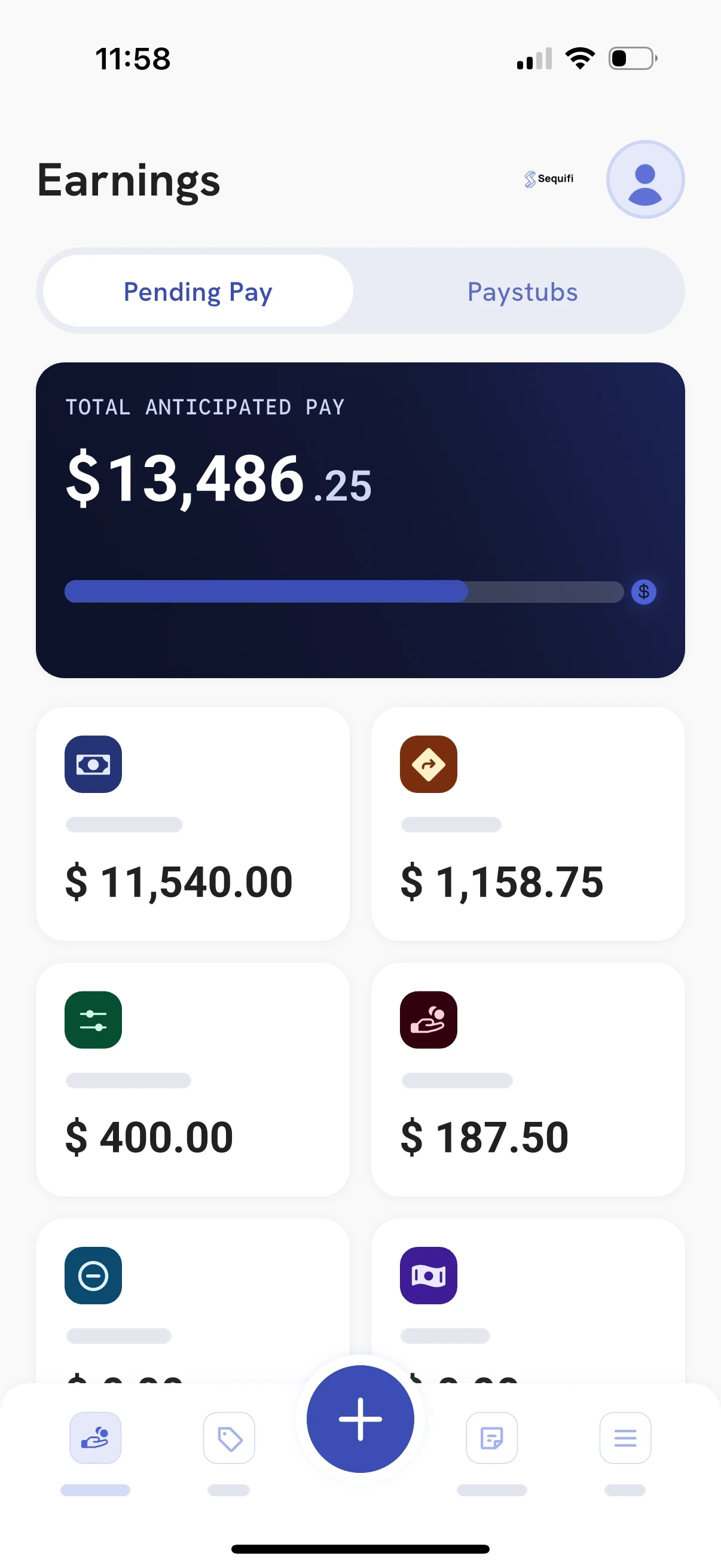
Reps see pending pay for the current period broken into commissions, overrides and adjustments, so they understand their number before payday instead of asking the back office to check it.
Earnings as deals land
Not a number that appears two weeks later.
Commissions and overrides, separated
Each category shown on its own, not as one lump sum.
Adjustments in the open
Corrections are visible rather than an unexplained difference.
Fewer pay disputes
Far fewer “can you check my pay?” messages to your back office.

New roles, new markets, new plans. The math keeps up.
Add a position, change a tier or open a new region, and the new rules apply from the next deal. Nothing to rebuild at the end of the period.
Most commission software stops at the calculation. Sequifi doesn't.
Calculate
Rules applied to live data
Approve
Reviewed before anything pays
Pay
Straight into payroll
The commission your team calculates shouldn't need to be exported, reconciled and rebuilt inside another payroll system. Sequifi connects commission calculation and payroll in one workflow, alongside the HR, onboarding and documents that sit around it.
Three ways to run commissions. Only one of them keeps up.
The manual way
Spreadsheets
- Complex commissionsManual
- Tiered structuresManual
- Splits + overridesManual
- Automatic calculationNo
- Rep visibilityNo
- AuditabilityLimited
- Commission → payrollNo
The partial way
Generic payroll
- Complex commissionsLimited
- Tiered structuresLimited
- Splits + overridesLimited
- Automatic calculationLimited
- Rep visibilityNo
- AuditabilityPartial
- Commission → payrollPartial

The connected way
Sequifi
- Complex commissionsYes
- Tiered structuresYes
- Splits + overridesYes
- Automatic calculationYes
- Rep visibilityYes
- AuditabilityYes
- Commission → payrollYes
How Sequifi compares to other commission software.
Most commission tracking tools calculate the payout and hand it to a separate payroll system. Here is where each one stops, and where Sequifi keeps going. For a wider roundup, see our guide to the best commission software.
- CaptivateIQIncentive compensation software. It hands payouts to payroll; it doesn't run payroll or HR.Sequifi:Commissions, payroll, HR and onboarding in one platform.Sequifi vs CaptivateIQ
- QuotaPathCommission tracking that pushes payouts to a separate payroll provider.Sequifi:Commissions, payroll, HR and performance in one platform.Sequifi vs QuotaPath
- EverstageIncentive compensation software that exports payouts to payroll; it doesn't run payroll.Sequifi:Commissions, payroll, HR and onboarding in one platform.Sequifi vs Everstage
- PerformioIncentive compensation software that prepares payroll files; it doesn't run payroll.Sequifi:Commissions, payroll, HR and onboarding in one platform.Sequifi vs Performio
- XactlySales performance and incentive compensation software that integrates with payroll.Sequifi:Deep commission logic plus payroll and HR, without an enterprise implementation.Sequifi vs Xactly
- Salesforce SpiffIncentive compensation management in Salesforce Sales Cloud. Payroll and HR run in other systems.Sequifi:Commissions, payroll, HR and a rep app in one platform.Sequifi vs Salesforce Spiff

Pay day, without the pay day scramble.
Commissions are already calculated and checked when the period closes, so the person who runs pay reviews and approves instead of rebuilding. And when every rep can see what they earned, the second-guessing stops.
- No more “can you check my pay?” messages
- Approve the period instead of rebuilding it
- Fewer disputes, faster payroll
Built for compensation that gets complicated
Sequifi is native to the industries where nearly every paycheck is different. See the fit for your team: solar commission software, roofing commission software, pest control commission software, door-to-door commission software and mortgage commission software, or start with the home services payroll hub.







“If you want to build instant trust with reps, give them full transparency on pay. Sequifi does that for us.”
85%
faster rep onboarding
Commission software questions
What is commission software?
Commission software, also called sales commission software, commission calculation software or commission management software, calculates and manages variable compensation: the rates, tiers, splits, overrides, bonuses, adjustments and clawbacks that decide what each person earned. Instead of rebuilding a spreadsheet every pay period, the rules live in the system and run the same way every time. Sequifi goes a step further than most commission software by carrying approved commissions straight into payroll.
What is commission tracking software?
Commission tracking software follows each commission through the whole cycle: what was earned, which rule produced it, whether it has been reviewed and approved, whether it has been paid, and any adjustment or clawback applied afterwards. Sequifi works as commission tracking software as well as commission calculation software. Admins can track commissions across teams, roles and locations, and each rep can track their own earnings line by line, so the answer to "what am I owed" does not depend on someone opening a spreadsheet.
How is commission software different from payroll software?
Commission software works out what each person earned. Payroll software pays it. Most commission software stops at the calculation and leaves you to export, reconcile and re-key the result into a separate payroll system. In Sequifi, approved commissions move into payroll inside the same platform, so the numbers you approve are the numbers you pay.
Can Sequifi handle setter and closer splits, overrides and clawbacks?
Yes. A single deal can be split across setters, closers and other contributors by rule, and manager or team-level overrides are calculated on top without anyone doing the math twice. Tiered rates are applied automatically as reps cross each threshold. Unqualified or cancelled business can be reversed through clawbacks, and every change is traceable back to the rule that caused it.
Does Sequifi pay both W-2 employees and 1099 contractors?
Yes. In Sequifi, 1099 contractors and W-2 employees run in the same system, each with the onboarding, tax treatment and payout handling it requires. Each rep is assigned a comp plan, and manager overrides are calculated from the same accounts, so the rep and their upline are paid from one source of truth.
Does Sequifi support same-day pay?
Yes. Sequifi offers same-day pay, which sends funds to your team the day you process payroll, and next-day pay, which delivers them the following business day.
What does Sequifi integrate with?
Sequifi works with the CRM and operations systems commission-driven teams already use, including HubSpot and Salesforce, JobNimbus and AccuLynx for roofing, Enerflo and Solo for solar, FieldRoutes for pest control, and Encompass for mortgage. Deal and job data flows in without a manual export, so commissions are calculated from the same records your team already works in.
How long does implementation take?
Sequifi implementations are measured in weeks. Because the common commission structures for solar, roofing, HVAC, pest control, fiber, and mortgage already exist in the system, setup is adjusting existing logic to your plan rather than building it from scratch.
Can reps see their commissions?
Yes. Reps get a line-by-line view of what they have earned, covering commissions, overrides, adjustments and pending pay for the current period, so they understand their number before payday instead of asking the back office to check it.

Your commission plan can be complicated. Running it shouldn't be.
See how Sequifi calculates, approves and pays complex compensation.
See Sequifi in action.
Tell us how your team gets paid and we'll show you how Sequifi calculates, approves and pays it.