
Payroll processing software
Run payroll with confidence, every cycle.
Sequifi handles the full payroll cycle, commissions, salaries, deductions, approvals, and final processing, in one automated workflow. Stop running payroll on spreadsheets and manual exports.


Payroll
May cycle
Net payout
$668,60000
Definition
What does payroll processing cover?
Sequifi runs the payroll itself. Commissions calculated in the same system arrive with salaries, overrides, reimbursements and deductions already on the run, W-2 employees and 1099 contractors go through the same cycle, and the figure that was approved is the figure that pays.
Trusted by commission-driven teams
Trusted by 20,000+ reps, managers, and operators


'%3e%3cpath%20d='M31.2869%2012.8799H33.7746C33.9584%2014.5955%2035.0859%2015.4656%2037.1325%2015.4656C38.5908%2015.4656%2039.7918%2014.8406%2039.7918%2013.5171C39.7918%2012.0833%2038.4682%2011.7647%2036.3481%2011.2745C33.8604%2010.723%2031.7771%2010.0612%2031.7771%207.38966C31.7771%204.86515%2033.8604%203.59064%2036.7035%203.59064C39.804%203.59064%2041.5932%205.07348%2041.8506%207.53672H39.4364C39.2403%206.22544%2038.2476%205.49015%2036.679%205.49015C35.1962%205.49015%2034.2035%206.11515%2034.2035%207.16907C34.2035%208.40681%2035.4903%208.72544%2037.5614%209.15436C40.0369%209.69358%2042.3163%2010.4289%2042.3163%2013.3088C42.3163%2015.9558%2040.0981%2017.4509%2037.1325%2017.4509C33.4805%2017.4509%2031.4094%2015.6004%2031.3114%2012.8799H31.2869Z'%20fill='black'%3e%3c/path%3e%3cpath%20d='M46.9485%2012.647V3.79901H49.424V12.598C49.424%2014.3872%2050.4044%2015.3064%2052.3039%2015.3064C54.2034%2015.3064%2055.1348%2014.3505%2055.1348%2012.5613V3.79901H57.6226V12.6348C57.6226%2015.7843%2055.5637%2017.3652%2052.2794%2017.3652C48.9951%2017.3652%2046.9363%2015.8088%2046.9363%2012.6348L46.9485%2012.647Z'%20fill='black'%3e%3c/path%3e%3cpath%20d='M62.451%203.79901H65L69.424%2010.7966C70.1348%2011.9608%2071.0907%2013.897%2071.0907%2013.897H71.1397C71.1397%2013.897%2070.9926%2011.8137%2070.9926%2010.4902V3.79901H73.3456V17.1446H70.7966L66.3848%2010.1838C65.6495%208.99509%2064.7059%207.05882%2064.7059%207.05882H64.6691C64.6691%207.05882%2064.7917%209.14215%2064.7917%2010.4657V17.1323H62.4387V3.79901H62.451Z'%20fill='black'%3e%3c/path%3e%3cpath%20d='M79.0688%203.79901H81.5443V14.9755H88.0394V17.1446H79.0811V3.79901H79.0688Z'%20fill='black'%3e%3c/path%3e%3cpath%20d='M94.5713%2011.8749L89.8899%203.81122H92.635L94.5222%207.18132C95.1105%208.25975%2095.8458%2010.0367%2095.8458%2010.0367H95.8825C95.8825%2010.0367%2096.6301%208.28426%2097.2306%207.18132L99.1301%203.81122H101.765L97.0713%2011.9117V17.1446H94.5835V11.8749H94.5713Z'%20fill='black'%3e%3c/path%3e%3cpath%20d='M115%203.79901H117.475V9.16666H123.37V3.79901H125.858V17.1446H123.37V11.2255H117.475V17.1446H115V3.79901Z'%20fill='black'%3e%3c/path%3e%3cpath%20d='M129.963%2010.5147C129.963%206.51958%20132.488%203.55389%20136.52%203.55389C140.552%203.55389%20143.076%206.50732%20143.076%2010.5147C143.076%2014.522%20140.552%2017.451%20136.52%2017.451C132.488%2017.451%20129.963%2014.4975%20129.963%2010.5147ZM140.539%2010.5147C140.539%207.73282%20139.179%205.60046%20136.544%205.60046C133.909%205.60046%20132.488%207.73282%20132.488%2010.5147C132.488%2013.2965%20133.885%2015.3554%20136.544%2015.3554C139.204%2015.3554%20140.539%2013.272%20140.539%2010.5147Z'%20fill='black'%3e%3c/path%3e%3cpath%20d='M147.194%203.79901H150.478L152.66%2010.147C153.174%2011.7034%20153.824%2014.6323%20153.824%2014.6323H153.873C153.873%2014.6323%20154.522%2011.7279%20155.025%2010.147L157.182%203.79901H160.539V17.1446H158.223V10.1838C158.223%208.72548%20158.383%206.0294%20158.383%206.0294H158.346C158.346%206.0294%20157.794%208.48038%20157.365%209.81617L154.841%2017.1446H152.831L150.282%209.81617C149.853%208.49264%20149.302%206.0294%20149.302%206.0294H149.265C149.265%206.0294%20149.424%208.73774%20149.424%2010.1838V17.1446H147.206V3.79901H147.194Z'%20fill='black'%3e%3c/path%3e%3cpath%20d='M166.605%203.79901H176.36V5.91911H169.081V9.21568H175.515V11.201H169.081V14.9632H176.52V17.1323H166.605V3.79901Z'%20fill='black'%3e%3c/path%3e%3cpath%20d='M11.5195%2020H1.45825L8.19845%2011.2133H18.2597L11.5195%2020Z'%20fill='%233680F8'%3e%3c/path%3e%3cpath%20d='M10.0613%208.78677H0L6.7402%200H16.8015L10.0613%208.78677Z'%20fill='%233680F8'%3e%3c/path%3e%3c/g%3e%3cdefs%3e%3cclipPath%20id='clip0_424_22397'%3e%3crect%20width='176.52'%20height='20'%20fill='white'%3e%3c/rect%3e%3c/clipPath%3e%3c/defs%3e%3c/svg%3e)














Trusted by 20,000+ reps, managers, and operators across commission-led teams
Three steps, then it runs every cycle
Step 01
The run assembles itself
Commissions, salaries and reimbursements are already recorded when the cycle opens.
 Ops opens the cycle
Payroll
Cycle open
Step 02
Two people sign it off
A manager reviews, finance confirms, both looking at the same totals.
 Finance approves it
Payroll
Approvals
Step 03
Then it pays
W-2 and 1099 in the same cycle, with stubs issued and taxes withheld.
 The team gets paid
Payroll
Paid
No more last-minute scrambles to get payroll Out
Payroll delays cost you credibility with your team. Errors cost you even more. Sequifi automates the preparation, approval, and execution steps so every cycle runs cleanly, on time, with the right numbers, and with a full audit trail behind it.
From payroll prep to final processing, fully automated
Sequifi pulls in commissions, advances, deductions, and salary data automatically each cycle. Your payroll team reviews, approves, and runs, without re-entering anything or reconciling across tools.
Payroll cycle
Ready to run
All items reviewed and approved
Fig. 02: the cycle
From cycle open to paid
The run assembles itself from work already recorded, so closing a cycle is a review rather than a rebuild.
Step 01
The cycle opens
84
Everyone due in this run, W-2 and 1099 together.
Step 02
Commissions arrive
$571,240
Calculated in the same system, not imported from a spreadsheet.
Step 03
Everything else joins
$97,360
Overrides and reimbursements land on the same run.
Step 04
Approvals close it
2 steps
Manager review, then finance, with the totals in front of them.
Step 05
It pays
$668,600
On schedule, with pay stubs issued and taxes withheld.
One run, every line
May cycle
84
Employees and contractors in the same run
Commissions
Calculated in Sequifi this period
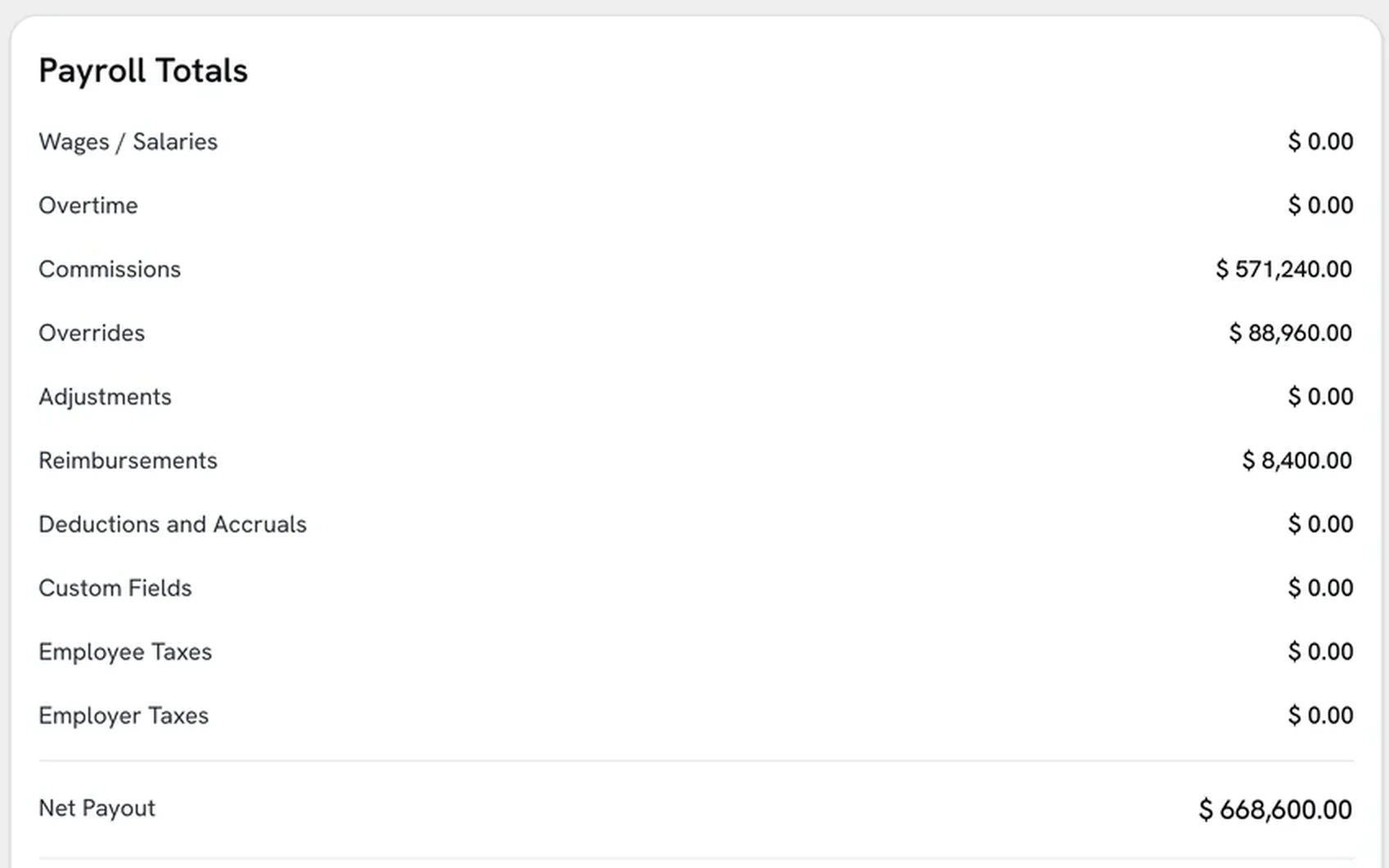
$571,240.00
Overrides
Manager and branch, on the same deals
$88,960.00
Reimbursements
Approved expenses in this cycle
$8,400.00
Net payout
$668,600.00
Illustrative example, from a demo account. $571,240.00 plus $88,960.00 plus $8,400.00 is $668,600.00.
The full payroll cycle, in one Workflow
01 · Cycle Automation
Payroll prep that runs itself
Every pay cycle, Sequifi automatically pulls in commission calculations, approved advances, salary data, and deductions, built into a complete payroll run ready for review. No manual data gathering, no spreadsheet prep, no chasing down numbers from other tools.
every pay type on its own line
02 · Payroll Approvals
One approval gate before payroll goes out
Every payroll run goes through a structured review before processing, line items are visible and the right people sign off before anything moves. Finance and operations see the same data, and approval is tracked with a full audit trail.
Payroll
Approvals
03 · Finance Routing
Payroll connects directly to your finance workflow
Once payroll is approved, it routes to your bank, accounting system, and finance team automatically. No manual exports, no copying totals into another tool, the approved run is exactly what gets executed.
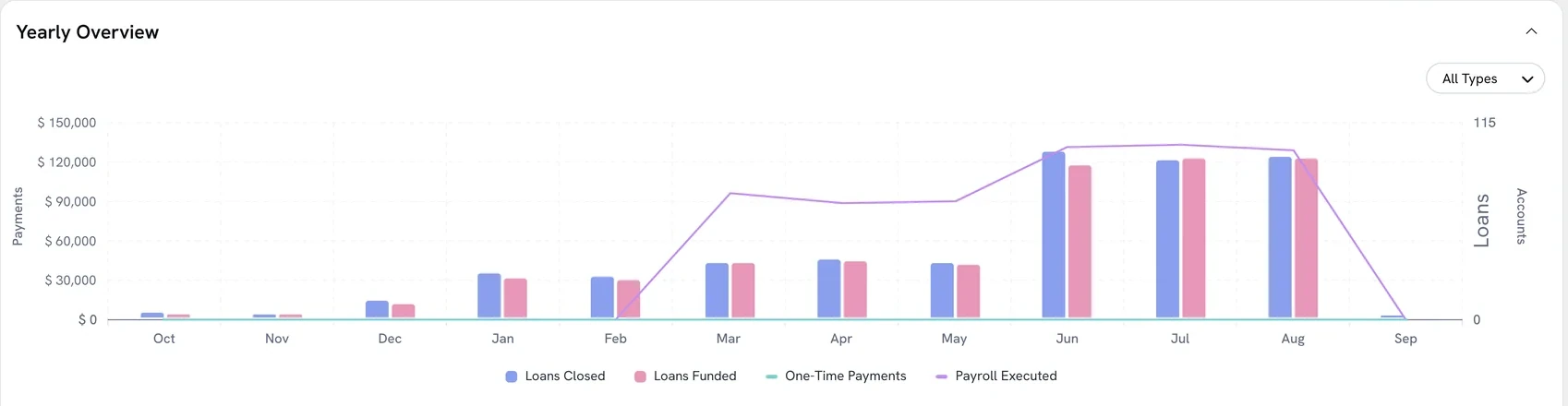
cycle after cycle
04 · Salary Insights
Full cycle visibility for every payroll run
Track payroll totals, cost by department, and cycle timing across every pay period. Spot trends before they become problems and keep leadership aligned with real-time payroll data.
Reports
By office

Every cycle on time, every number accurate
Sequifi runs the same structured process every cycle, so your payroll team isn't scrambling, your employees aren't waiting, and errors don't make it through to final processing.
What payroll covers today
- Worker types
- W-2 employees and 1099 contractors in the same run
- Pay types
- Salary, hourly, commissions, overrides, reimbursements, deductions
- Cadence
- Weekly, biweekly, semi-monthly or monthly
- Approvals
- Manager review then finance sign-off, on the same totals
- Speed
- Same-day or next-day delivery, chosen per run
- After the run
- Pay stubs issued, taxes withheld, reports by office and role
Comparing us with something else
Questions? We're glad you asked.
Sequifi automates payroll data preparation, pulling in commission calculations, advances, deductions, and salary data each cycle, plus the approval workflow and final processing. Your team reviews and approves, and the system handles execution. No manual data entry, no spreadsheet reconciliation.
Commissions calculated in Sequifi flow directly into the payroll run, already approved, already itemized. There's no separate export or manual step. Everything that was approved in the commission workflow is ready for payroll automatically.
Yes. You can configure a sequential or parallel approval chain, for example, a sales manager approves commissions, then a finance lead approves the full run. Every approval is logged with a timestamp so you have a complete audit trail.
Every line in the run is visible before anyone approves it, broken out by employee and by pay type. Your team corrects it before payroll processes, not after.
Yes. You can run different payroll cycles for different teams, weekly commissions for field employees, bi-weekly for salaried staff, monthly for management, all from the same system with separate approval and processing workflows.
Most teams are running their first payroll cycle in Sequifi within 1-2 weeks. The onboarding team helps migrate your existing pay structures, deduction rules, and employee data so you're not rebuilding from scratch.
Request a demo
See how Sequifi runs the full payroll cycle, commission sync, approvals, and processing, in one automated workflow. Book a quick walkthrough with our team.