Best roofing commission and payroll software (2026): compared
Roofing commission and payroll software compared: Sequifi, STAKT, AccuLynx, JobNimbus, D2DHQ, ProDBX and Gusto, and how to choose for margin splits, supplements and clawbacks.
Quick answer: a roofing company needs software that can calculate commission from the final job margin, split it between the canvasser, closer and project manager, hold or claw back pay when a job cancels or a supplement changes the numbers, and get the result into payroll. Sequifi is not a CRM: your CRM tracks the job, and Sequifi pays the people who sold it. It does the commission calculation and the payroll in one platform, for W-2 and 1099 reps, and connects to JobNimbus, AccuLynx and Proline. STAKT is a dedicated commission tool that pays commissions directly or exports them to your payroll provider. AccuLynx and JobNimbus are roofing CRMs, so most companies run one of them alongside commission software rather than instead of it. Gusto and QuickBooks Payroll pay a commission only after it has been calculated somewhere else.
Roofing commission and payroll software compared
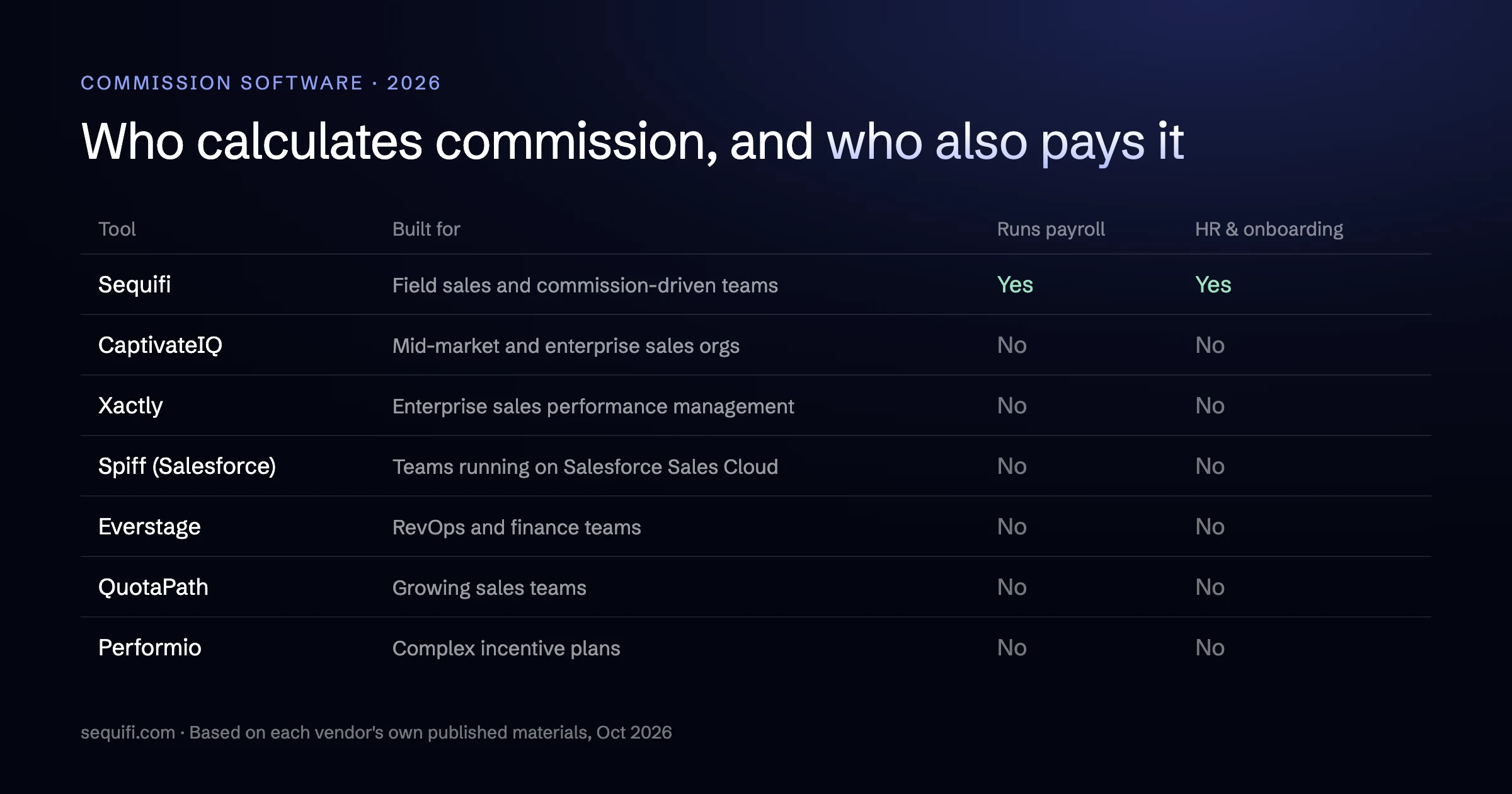
The tools roofing companies look at fall into three groups: roofing CRMs, dedicated commission software, and payroll. The useful questions are whether a tool can calculate a roofing commission from job data and whether it actually pays people. Each claim below comes from the vendor's own website as of October 2026.
| Platform | What it is | Calculates roofing commissions? | Runs payroll? | Best fit |
|---|---|---|---|---|
| Sequifi | HR, payroll and commission software for commission-driven field sales teams | Yes. Margin-based splits, per-job rates, tiered bonuses, manager overrides, spiffs, milestone payouts and clawbacks | Yes, W-2 and 1099 reps, with same-day or next-day pay | Roofing companies that want commissions, payroll, hiring and onboarding in one system, connected to JobNimbus, AccuLynx or Proline |
| STAKT | Commission automation software for field sales and home services | Yes. Canvasser, closer and project manager splits, milestone pay, and recalculation when supplements or change orders move the job value | Pays commissions directly, including same-day, or exports payouts to your payroll provider | Teams that want a dedicated commission tool and plan to keep their current payroll and HR systems |
| AccuLynx | All-in-one roofing CRM and business management platform | Has a commissions module: calculate a rep's commission on a job and track what has been earned, approved and paid | Not listed on its site. Syncs accounting data with QuickBooks | Roofing companies choosing a CRM, production and job costing system |
| JobNimbus | CRM and project management software for roofing and other contractors | Not listed on its site | Not listed on its site. Two-way QuickBooks sync | Roofers that need leads, jobs, scheduling, invoicing and payments in one place |
| D2DHQ | Commission operations and canvassing software for door-to-door teams, with roofing among its listed industries | Yes. Per-rep rate cards, splits, daily bonuses, clawbacks, escrow holdbacks and signed rep statements | No. Prepares contractor bills in BILL or QuickBooks Online and says it does not send money itself | Door-to-door teams paying 1099 reps per deal who want canvassing and commission statements together |
| ProDBX | All-in-one contractor software (CRM, estimating, project management, accounting) focused on pool and fence, with a roofing package | Yes. A default percentage per rep, paid at job completion, payment in full or a chosen phase, plus crew piece-rate splits | Has a payroll app. Its roofing page says it sends employee wages to your payroll company; contractor pay goes to accounts payable | Contractors who want commissions inside one operations and accounting system |
| Gusto / QuickBooks Payroll | Payroll, benefits and HR, with commission entered as a dollar amount at payroll | No. The commission has to be worked out somewhere else first | Yes | Teams where commission is a small, simple add-on to hourly or salaried pay |
Where a cell says "not listed on its site", the vendor may still offer it through an add-on or partner. Ask during the demo.
What roofing compensation actually needs
One roofing job can pay three or four people at different times, and the amount can change after the first payment goes out. Before comparing software, write down how your plan works on these points. For worked examples of each model, see our guide to roofing sales commission structures.
Several people paid on one job
Storm and retail teams often split a job between a canvasser or setter who knocked the door, a closer who signed the contract, and a project manager who ran the build. Sales managers take an override on top. Crew leads may be paid a flat amount per job. The software has to attribute each job to the right people and apply each person's plan, not just one rep's rate.
Commission on margin, not just contract price
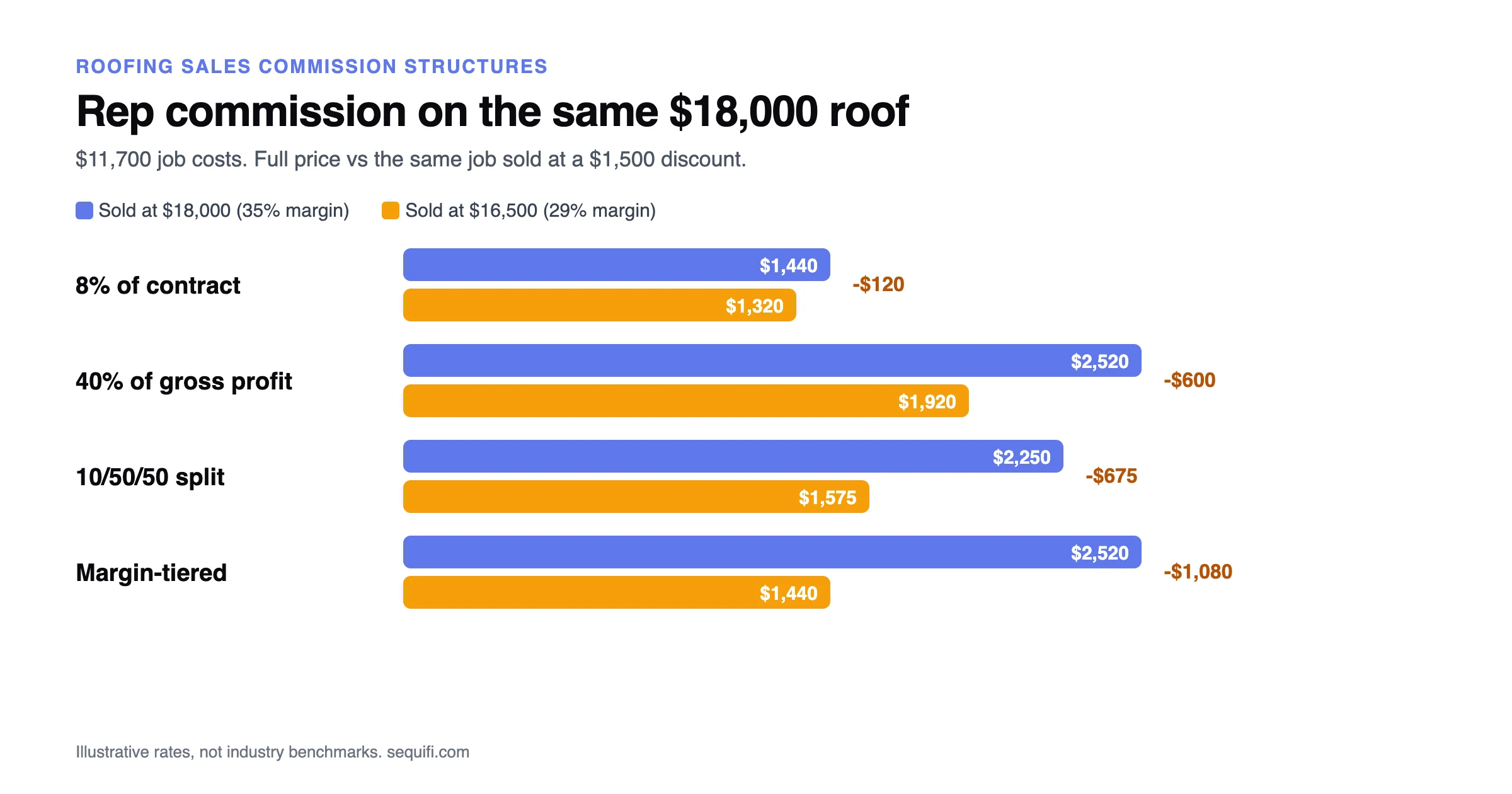
Many roofing companies pay on gross profit, or on a split such as 10/50/50, because a rep who discounts a roof should not earn the same as one who sells it at full price. That means the software needs job cost data from your CRM or production system. If the margin only lives in a spreadsheet, the commission will too.
When the commission is earned
Common triggers are contract signed, job completed and paid in full. Some companies split the payment, for example half at contract and half at completion. Whatever you choose, the tool should release pay automatically when a job reaches that stage, and show the rep what is still pending.
Supplements and insurance claims
On insurance work the job value can move several times: the initial scope, approved supplements, change orders and the final payment from the carrier. If commission is paid before those numbers settle, the software has to recalculate and carry the difference into a later check.
Cancellations and chargebacks
Homeowners cancel and claims get denied. A clawback rule decides what comes back out of the rep's next check and when. Doing this by hand is where most roofing pay disputes start.
Storm season and the W-2 and 1099 mix
After a big storm, roofing companies often add reps quickly, and many teams pay a mix of W-2 employees and 1099 contractors. New reps need to be hired, onboarded and set up on a comp plan fast, and each worker type needs the right tax treatment. If your commission tool and your payroll are separate, every new rep has to be set up twice.
CRM with commissions vs. commission software vs. payroll
Roofing CRMs: AccuLynx and JobNimbus
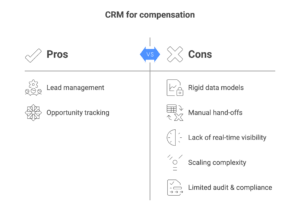
AccuLynx and JobNimbus run the front of a roofing business: leads, estimates, production, scheduling, invoicing and payments. AccuLynx lists a commissions module that calculates a rep's commission on a job and tracks what has been earned, approved and paid. JobNimbus does not list commission calculation among the features on its site. Neither lists payroll.
That is why the choice is usually not "CRM or commission software". The CRM is where the job, its value and its costs live. Sequifi connects to JobNimbus, AccuLynx and Proline, so job and margin data flows in without a manual export, and Sequifi calculates the commission and runs payroll. In practice that means "CRM plus Sequifi".
Dedicated commission software: STAKT and D2DHQ
STAKT is commission automation software for field sales and home services. Its roofing page describes canvasser, closer and project manager attribution, milestone pay from signed contract through final collection, and recalculation when supplements, change orders or insurance adjustments change the job value. It supports tiers, splits, overrides and multi-level structures, and it can pay commissions directly, including same-day, or export payouts to a payroll provider. Hiring, background checks and document signing are not listed among its features. See Sequifi vs. STAKT for a side-by-side comparison.
D2DHQ combines canvassing (territories, knock tracking, callbacks) with commission operations: per-rep rate cards, splits, daily bonuses, clawbacks, escrow holdbacks and signed rep statements. It prepares contractor bills in BILL or QuickBooks Online, and its site says it does not send money itself. It fits door-to-door teams that pay 1099 reps per deal.
All-in-one contractor software: ProDBX
ProDBX is an all-in-one system for contractors, built mainly for pool and fence companies, with a roofing package. It lets you set a default commission percentage per rep and pay it at job completion, payment in full or a chosen phase, and it splits piece rates across crew members. Its payroll app records commissions and, according to its roofing page, sends employee wages to your payroll company.
Payroll with commissions: Gusto and QuickBooks Payroll
General payroll tools pay commission as a pay type. Gusto is payroll, benefits and HR, with commission entered as a dollar amount at payroll. QuickBooks Payroll works the same way. Someone still has to calculate each rep's commission from job margins, splits and clawbacks before payroll runs. See Sequifi vs. Gusto for more detail.
Commission and payroll in one platform: Sequifi
Sequifi is HR, payroll and commission software for commission-driven field sales teams. For roofing it handles margin-based splits, per-job flat rates for crew leads, tiered revenue bonuses, manager overrides, spiffs, milestone payouts and clawbacks, with separate plans for reps, crew leads and project managers. When a job cancels or the final margin changes after payout, the adjustment applies to the next cycle by rule. Payroll runs in the same system for W-2 and 1099 reps, with same-day pay or next-day pay. Hiring, background checks and onboarding documents e-signed in SequiDocs are part of the same platform, so a new rep's comp plan and direct deposit flow straight into payroll. More on the roofing industry page.
How to choose
These questions sort most roofing companies quickly:
- Do you pay on margin? If yes, confirm the tool can pull final job costs from your CRM and recalculate when they change. A flat percentage of contract is easier for any tool.
- How many people are paid per job? If a canvasser, closer, project manager and manager override all come off one roof, test that exact job in the demo.
- When is commission released? Check that the tool supports your trigger (contract, completion, paid in full, or a split) and shows reps what is pending.
- How are supplements and cancellations handled? Ask to see a supplement raise the job value after a partial payout, and a cancelled job clawed back from the next check.
- Who runs payroll? If commission and payroll are separate tools, someone exports and re-keys amounts every cycle. If you pay W-2 and 1099 reps, check that one system handles both.
- What happens in storm season? Count the steps to hire, onboard and pay a new rep. Fewer systems means fewer places to set up each person.
- Which CRM do you use? Keep it. Choose commission and payroll software that connects to it.
A rough rule: if you are happy with your payroll provider and your plans are simple, a roofing CRM's commission feature or a dedicated commission tool may be enough. If you pay on margin across several roles, mix W-2 and 1099 reps, and spend hours each cycle reconciling commission with payroll, look at a platform that does both. For more on the cost of keeping commissions in spreadsheets, see why roofing operators are moving to commission tracking software.
Frequently asked questions
What is the best commission software for a roofing company?
It depends on what you need the software to do. If you want commissions calculated from final job margin and paid through payroll in the same system, Sequifi does both for W-2 and 1099 reps and connects to JobNimbus, AccuLynx and Proline. STAKT is a dedicated commission tool that can pay commissions directly or export them to your payroll provider. AccuLynx includes a commissions module inside its roofing CRM, and payroll tools such as Gusto pay a commission once it has been calculated elsewhere.
Can AccuLynx or JobNimbus calculate roofing sales commissions?
AccuLynx lists a commissions module that calculates a rep's commission on a job and tracks what has been earned, approved and paid. JobNimbus does not list commission calculation among the features on its site. Neither lists payroll processing. Many roofing companies keep one of these CRMs and connect it to commission and payroll software such as Sequifi.
Should roofing reps be paid commission when the contract is signed or when the job is paid?
Paying at signature is fastest but means more clawbacks when jobs cancel or margins change. Many roofing companies pay part of the commission when the job is built and the balance once the homeowner or insurer has paid, so the final number is based on collected revenue and final job costs.
How should commission software handle insurance supplements?
An approved supplement changes the contract value and often the job costs, so the commission should be recalculated on the final numbers. Look for software that recalculates automatically when the job value changes and applies any difference to the next pay cycle.
Can one system pay W-2 and 1099 roofing reps?
Yes, if it runs payroll. Sequifi pays W-2 employees and 1099 contractors in the same system, each with the right tax treatment. Commission-only tools calculate the amount but rely on a payroll provider or an accounts payable process to pay it.
Can Gusto or QuickBooks Payroll handle roofing commissions?
They can pay a commission, but they do not work it out from your jobs. Commission is entered as a dollar amount when you run payroll, so margin splits, overrides and clawbacks still have to be calculated in a spreadsheet or another tool first.
Want to see your own roofing comp plan calculated and paid in one system? See how Sequifi handles roofing commissions and book a demo.
See Sequifi run your kind of pay.
Commissions, payroll and HR in one platform, built for teams where every paycheck is different.
Book a demo